Autoplay configurations in Gates of Olympus let Indian gamblers sustain the reels spinning without pressing the spin button every instance gatesolympus.in. The slot’s tumble features and multiplier icons often generate long sequences of wins, so the right autoplay rules enable you watch the action instead of the controls. This guide details every setting, from spin counts and loss maximums to single-win caps, so you can set sessions that match your bankroll and risk degree. Regardless of you are playing the game for the first attempt or want a repeatable strategy, knowing how each configuration works with the tumble-and-multiply gameplay helps you prevent surprises.
Bet Size Modifications While Using Autoplay
Autoplay doesn’t lock your bet size, so you can continue to change the stake between automated sequences if the platform allows mid-session edits. Start at the lower end of the game’s range, usually 0.20 per spin, and watch how frequently the tumble chains generate returns above your bet. After you get a clear picture of hit frequency, you can increase the stake in small increments, like moving from 0.20 to 0.40, then to 1.00, while maintaining the same spin count and loss limit. This gradual approach lets you scale exposure without resetting your autoplay parameters every time. Make sure to confirm the new bet amount on the summary screen before resuming the automated spins so you steer clear of accidental jumps to higher stakes.
Frequent Pitfalls and How to Avoid Them
A typical misstep is choosing a high spin count without corresponding loss limits, which can cause lengthy, unbroken sessions that go beyond planned budgets. An additional misstep is ignoring the single-win cap, letting a single tumble chain with multiple high-value orbs to push winnings far beyond comfort levels and possibly change your overall strategy. Gamers also at times forget to review autoplay settings after switching devices or refreshing the game client, causing old parameters to carry over unexpectedly. To prevent these problems, examine every field in the autoplay panel at the start of each session and keep a quick note of your preferred spin count, win limit, and loss cap. A thirty-second check prevents most problems and maintains autoplay alignment with your current bankroll and goals.
Establishing Win and Loss Limits Properly
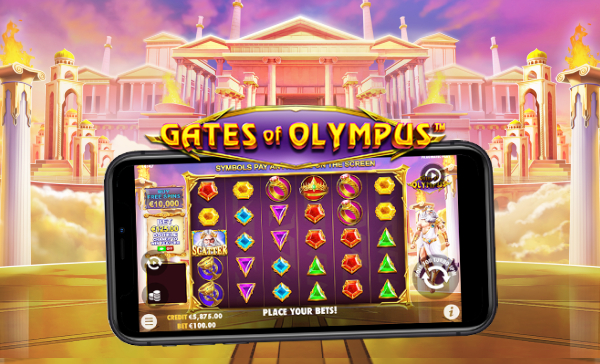
Win and loss limits serve as automatic brakes that halt autoplay when results drift outside your comfort zone. A single-win limit of 50 times your bet performs well for Gates of Olympus because the multiplier orbs can drive a single tumble chain well above that level. If the limit is reached, autoplay stops and you can decide whether to continue manually or adjust the setting. For loss limits, consider 30 percent of your session bankroll as a common benchmark; this permits the natural variance of the slot while still protecting the majority of your funds. Enter the values in the autoplay panel, confirm, and watch the balance meter to see how close you are to either boundary during play. These limits turn autoplay from a simple convenience into a disciplined bankroll tool.
Sophisticated Stop Conditions and Bonus Triggers
Beyond fundamental win and loss caps, Gates of Olympus delivers optional stop triggers tied to its bonus features. You can command autoplay to halt when three or more free-spin gate symbols land, ensuring you enter the bonus round with full attention. Another useful condition stops the reels when any multiplier orb of 100x or higher emerges, letting you review the result before carrying on. Some platforms also enable a stop after a defined number of consecutive non-winning spins, which prevents extended dry spells from depleting your balance. Try these advanced triggers during shorter sessions first so you understand exactly when they engage. Merging a bonus trigger with a loss limit gives you two separate safety nets that function jointly during longer automated runs.
Gradual Access to Autoplay Controls
Launch Gates of Olympus on your selected platform and hold on for the reels to show up. Identify the circular autoplay icon, typically next to the main spin button and marked with two curved arrows. Tap or click the icon to access a panel that lists the possible parameters. The panel shows fields for total spins, win limit per spin, loss limit per spin, and possible stop conditions including a bonus round trigger. Review each field, enter your values, and verify. Once activated, the reels will carry on to spin automatically until one of your stop conditions is reached or you push the stop button manually. Always double-check the summary screen before confirming so you are aware exactly when the sequence will pause.
The Reason Autoplay Settings Count for This Slot
Since every tumble may trigger another win, a single spin in Gates of Olympus may last far longer than the average three-reel slot. In the absence of autoplay limits, you risk letting an extended chain eat into your balance faster than expected. Setting a maximum number of spins, a single-win ceiling, and a loss threshold establishes clear boundaries that shield your funds and keep sessions enjoyable. Indian players who frequently play on mobile data also like autoplay because it minimizes taps and decreases the chance of accidental spins when the network slows. By matching autoplay rules with the slot’s volatility, you maintain control while still letting the tumble-and-multiply system unfold naturally.
FAQ
How can I access the autoplay panel for Gates of Olympus?
When the game finishes loading, find the circular icon with two curved arrows beside the spin button. Tap or click it to open the autoplay settings panel where you may input spin counts, win limits, and loss limits before finalizing your choices.
Can I change my bet size while in an autoplay sequence?
Many platforms let you pause autoplay, modify the stake, and then continue with the new bet amount. Always confirm the updated stake on the summary screen before restarting the automated spins to avoid unintended changes.
What occurs when the single-win limit is reached?
Autoplay ceases instantly, and the reels pause so you can check the result. You can then choose to continue manually, adjust the limit, or end the session, offering you full control over the next step.
Can I stop autoplay as soon as the bonus round triggers?
Yes, pick the bonus-trigger stop condition in the autoplay panel. After three or more free-spin gate symbols land, the reels will stop automatically, enabling you to enter the bonus round with undivided attention.
How many spins should beginners start with?
Use 20 to 50 spins while employing modest win and loss limits. This range gives enough time to see tumble chains and multiplier orbs without committing a large portion of your bankroll within one automated session.
Does autoplay work the same for mobile and desktop?
The settings and parameters remain consistent across devices, but button placement may differ slightly. Always check the summary screen once you enter values to verify your chosen limits are active before beginning autoplay with any device.
Comprehending the Game’s Core Mechanics
Gates of Olympus functions on a 6-reel, 5-row grid and pays through a 4,096-ways-to-win system. Matching symbols anywhere on neighboring reels from left to right generate a payout. The tumble feature removes winning symbols after every pay, letting new ones descend and form fresh combinations within the same spin. Multiplier orbs that bear values from 2x to 500x can appear on any spin and remain on the grid until the tumble sequence ends, after which they amplify the total payout. These two mechanics generate chains of wins that can continue several seconds, which is precisely why autoplay settings are important. Recognizing how long a single spin can last helps you choose realistic spin counts and loss limits that keep your bankroll intact during longer sequences.
Picking the Proper Number of Spins
The total number of spins you pick beforehand should reflect both your bankroll and the slot’s typical spin duration. A balanced starting point is 50 spins, which provides the tumble feature enough time to produce several multiplier orbs while keeping the session under thirty minutes. If you are experimenting with a new bet size, start with 20 spins so you can observe how often the free-spin gate symbols emerge. Greater counts like 100 or 200 spins fit longer sessions but require tighter loss limits to prevent large drawdowns. Remember that each tumble sequence is considered as part of a single paid spin, so the real time per spin can range from three seconds to more than fifteen when multipliers stack. Modify the spin count after a few manual rounds once you gain a feel for the game’s rhythm.